He’s disrespected pretty much everybody in the chess world, calling other players idiots and stuff. And also beating the great Magnus… Everybody knows that Hans is probably the most disrespectful teenager in chess.
Wesley So
When NTC becomes the text spammer
The National Telecommunications Commission (NTC) is an attached agency of the Department of Information and Communications Technology responsible for the supervision, adjudication and control over all telecommunications services and television and radio networks throughout the Philippines.
The NTC is supposed to regulate the telecommunication companies including the use of SMS in the Philippines. Recently it ordered telcos to block clickable links in text messages.
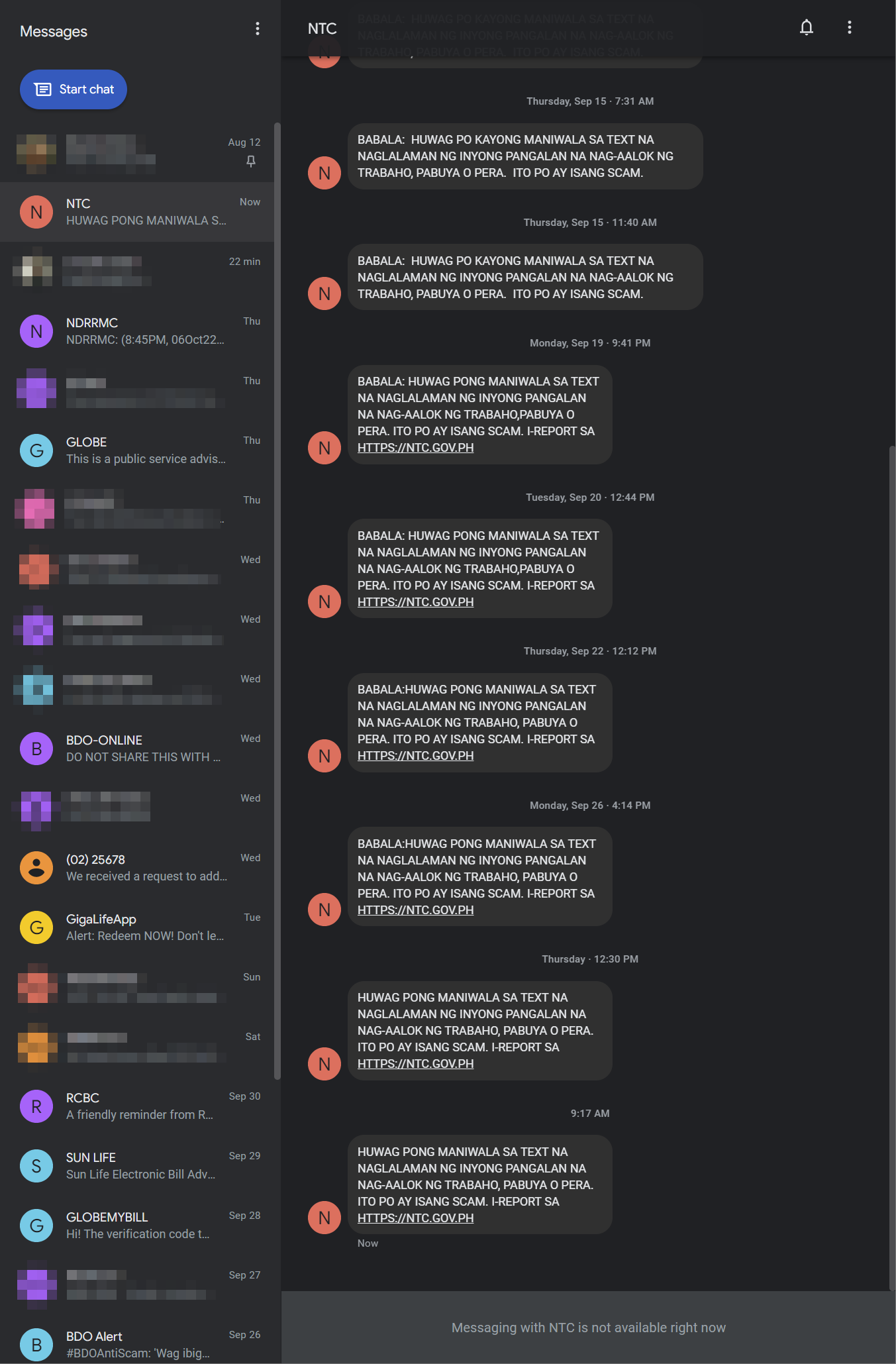
But looking at my Messages app, it appears they are the ones spamming recently instead:
I know, a lot of Filipinos need reminding about these scams repeatedly. But NTC shouldn’t stop at just sending these reminders, and thus spamming us in the process. They need to do their job and stop these spammers from the beginning.
How to do Lookup in Excel and Power Query
Lookup in regular Excel function
The XLOOKUP function has been available to Office 365 and Excel 2021. For compatibility purposes with my workbook’s potential users, I shy away from using this function. Instead, I use the combination of INDEX and MATCH.
Why not VLOOKUP?
I’m not sure if there are any hardware efficiency benefit from using INDEX and MATCH over VLOOKUP or HLOOKUP. But I use INDEX and MATCH primarily for two reasons:
- Ability to return the value of the column to the left of your lookup array (left-most column of the table array)
- Never worry about adding a column between the returned column and the lookup array. Remember, you indicate the column index number being the returned column from your table array? What if you’ve not touched your file for a long time, return to it and inserting a column in a table, forgetting that you’ve used that table as a table array as a lookup somewhere in your worksheet? You’ll certainly break your
VLOOKUPformula.
How to use these formulas
Sorry, but you have to look somewhere else for the usage of these formulas.
Lookup in Power Query
Power Query Lookup Sample File
To better demonstrate the functions, it’s better if we refer to a sample file:
Continue reading How to do Lookup in Excel and Power Query
BDO Online Mobile ‘ADD DEVICE’ Message Sending Failed
Did I already tell you how awful and trash-worthy BDO Online Banking is? Yet, no matter how bad it is, it has been your bank of choice, because you thought they find ways.
Installing the Mobile App
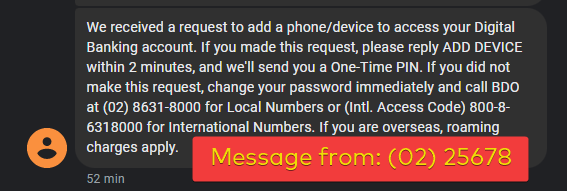
You installed the mobile app, and done with your mobile app only password. When you login, it asks for your OTP. But instead of receiving the OTP directly, you received a message from (02) 25678 that you need to reply with ‘ADD DEVICE’ instead. Only then will they text you your OTP.

But replying with ‘ADD DEVICE’ the message failed sending no matter how many times you tried.
The Solution
Instead of solving the problem directly, BDO Unibank offered a solution in a Facebook comment, which involves:
Continue reading BDO Online Mobile ‘ADD DEVICE’ Message Sending Failed
Your old Samsung phones, while in storage, may be at risk of blowing up
Arun of Mrwhosetheboss has brought up an issue about Samsung phones blowing up:
My own Samsung Galaxy Note 8, being with me for 5 years now, is decidedly showing wear as its battery cannot hold its charge as well as before. Except for the fact that it’s running on an Exynos chipset, I didn’t really have any more complaints about it. And with the Oneplus green screen issue that I personally experienced, I was ready to embrace the Samsung ecosystem.
The Galaxy devices I currently actively use include:
- Samsung Galaxy Note 8
- Samsung Galaxy S20 FE 5G
- Samsung Galaxy Tab S7 LTE
- Samsung Galaxy Buds2
- Samsung Galaxy Watch 4 Classic
For all these devices I have, I had no experience with swollen batteries (so far!). This may be the case as I actively use them. But this is not an excuse for Samsung. As mentioned in the video (and also in the comments section), how come it mostly affected Samsung devices only?
This issue has to be addressed by Samsung soon. Otherwise, they’ll lose one loyal customer in me in the future.
The Grand Lotto Chance

What’s the chance that 433 Filipinos picked a 6-number combination that are multiples of 9 (i.e., 9, 18, 27, 36, 45, 54) and they all win and share equally the P236 million jackpot, leaving each with just a meager P545,245 winning?
Slim chance!
SmartSuite came to challenge Airtable
Airtable has been my favorite No Code/Low Code tool for some time now. In a few years I’ve been using it so far, I haven’t really found a good alternative. Even then, Airtable cannot rest on its laurels. Especially now, a new kid in town, SmartSuite, came to challenge its position. Airtable has already been introducing substantial improvements recently, but it needs to up its game even further to hold on to its lead.
One of my favorite Youtuber, Gareth Pronovost, details down the 3 gamechanging features about SmartSuite that Airtable has to catch up on:
Smart Headlights — the car tech the Philippine roads badly need
Because of the lack of enough smart drivers, the Philippine roads badly need these smart headlights for its cars.
How to export your data from the Eufy Smart Scale C1
For some time, exporting your data from your Eufy smart scale has been a pain, with hacks developed for this supposedly simple process like this and this. So I posted a follow up query on Anker forum.
Thankfully, I received a response, and it states that starting with the update in the EufyLife app that was released August 5, 2022, you may now export your data from the app in CSV format, under Settings>>Privacy and Data>>Export All Data.

The option may have been buried deep into the settings, but at the least it’s there for data freaks like us. Just enter your password and your email address to where you want the CSV file will be sent to.
All the other available (so far) smart scale of Eufy use the same app, the EufyLife app, so I guess this is applicable to those as well, like the Eufy Smart Scale P2 and the P2 Pro.
Plex New Feature: Sync Watch State and Ratings
From Plex Support Article:
Plex allows you to optionally sync your watched/played state and personal ratings of movies and episodes with your Plex account online. That means that if you watch a movie on a friend’s server, it can update your account so that the movie will also be marked as watched on Plex’s Discover feature, our free Movies & Shows streaming service, and any Plex Media Server you have access to.
Does this mean I can do away with PlexTraktSync already?
From what I gather, if you have multiple Plex server, you can sync your watch state across all of them. Also, if you decide to migrate an existing Plex server or re-start a new server from scratch, it won’t be much of a pain carrying over your watch states, for you, the server owner, and your users. That’s neat. No more plugin, no more Trakt, and your users whom you’ve shared your library with can enable the same to their account (this settings is account-specific).

I’ve enabled this feature in my Account Settings. Now, let’s wait for it to do its magic.