A Picture Worth A Thousand Pictures

Western Digital

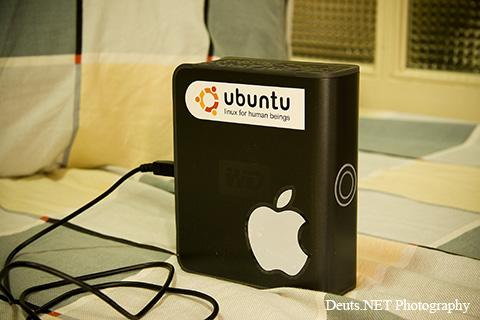
It’s a Western Digital My Book Premium Edition 500GB, that used to hold thousands of my pictures ever since I bought my Canon EOS 30D. Add to that the thousands as well of audio, video, programs, and data files. This is the picture that’s worth a thousand pictures.

Save for the images uploaded and saved in flickr, this is what remains of my photos… of Deuts.NET Photography.

Continue reading A Picture Worth A Thousand Pictures

The Ubuntu Experience

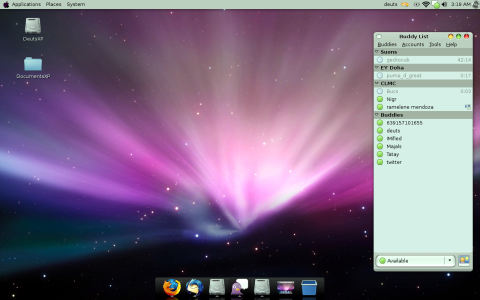
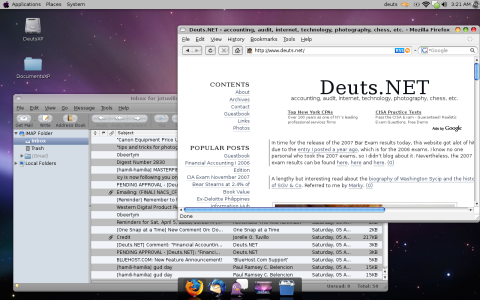
I’ve been tinkering with my laptop for the last week or so, and finally I was able to dual boot with Linux Ubuntu (Gutsy Gibbon v. 7.10) and Windows XP Service Pack 2. The result of which, as I was trying to show in my last post, is an OS X desktop look:

Deuts Desktop

I’ve searched the web for any help on how to do it, and so far the tutorial by Shailen Sobhee offered the greatest help, especially with the ability to choose at which operating you want to boot upon start up. I just wished though that from the start (not just in the comments section), he should have offered the procedures on how to partition (using the Paragon Partition Manager) the original Windows installation, that way I could have avoided losing my original installation (you see, I’m running a packaged Windows XP software into my machine with a systems recovery partition). Anyway, if you follow his tutorial, I suggest that you read through including the comments to know better. Nevertheless, it was a good and informative tutorial.

Continue reading The Ubuntu Experience

Gmail + Thunderbird + Addons

The ultimate combination to suit your daily email needs. All these for the total price of nil –nada –nothing! Now, what more could you ask for?

Creating a gmail account is free. It offers pop and imap access (of course, imap will always be better than pop) to enable you to access your email and send messages using a desktop email client like Thunderbird (ditch Microsoft Outlook), as well as 6.5GB of message storage space (so far).

Mozilla Thunderbird is likewise free, created by the same creator of another internet tool and browser, Mozilla Firefox. Setting up Thunderbird to fetch and send gmail messages is easy. Just refer to this tutorial and you’re ready to go.

Continue reading Gmail + Thunderbird + Addons

Awaiting WordPress 2.5

This site is proudly powered by WordPress (WP).

Wordpress LogoWith lots of updates going on into the core of wordpress install, particularly with the upcoming WordPress 2.5, a lot of features are being introduced. I’m afraid there will come a time that WordPress would not be as lightweight but functional as it used to be. WordPress users are asking for features left and right specific to their needs. The WordPress team, it appears to me, are moving towards satisfying all those requests by the various users in one package, that is WordPress.

Continue reading Awaiting WordPress 2.5

ZPDee Sucks Bigtime

Here I am agonizing over another crappy internet service from Smart 3G because Skycable‘s ZPDee sucks bigtime! At least with the former I have connection.

According to ZPDee’s contact page, you can contact them 24/7 using their hotline 631-0000. But try calling them at night, and you’ll get into an answering machine telling you to wait for the next available agent. I would rather have preferred to have been told to leave at once. For me, this is just bloody misrepresentation!

They also have an SMS contact number at 0917-631-0000 (i.e., if you’re using Globe), but don’t bother texting them, you’ll just put your credits into waste.

Continue reading ZPDee Sucks Bigtime

Organizing Your Tasks

Are you a task freak? Well, I guess I’m becoming one.

With so many projects at hand, may it be personal or work, or anything else, I needed a way to organize my actions and plan my tasks. I have been in the lookout for a good tasks organizer, an organizer that I can access from home and office computers, and even through my cellphone. It has to be digital, as I seemed don’t like the idea of bringing around an organizer with me wherever I go.

The todo list in my home and office computers as well as my cellphone must be synchronized, so the organizer from Microsoft Outlook is not applicable. In as much as I would like to utilize the organizer from my phone (calendar and to-do lists), it may not be able to hold up to my requirements, for a way to separate personal and work related tasks. Also, I would not bother organizing my tasks through the phone’s keypads, it’s just so inconvenient.

Continue reading Organizing Your Tasks
Blogging at Your Own Domain Name

A discussion over at The Blog Herald, some people adversely decide whether they should spend (waste?) time reading blogs that have url’s ending in “.blogspot.com” or “.wordpress.com”. To some, these url addresses bring negative connotations as to the contents of the blog, although this may not always be the case.

Everyone, indeed, can just simply create a new blog over those sites (blogger and wordpress.com) anytime for free. How sure can you be that the blog created from these sites you have bumped into is current, meaning maintained regularly and that the blogger was serious about it (which takes me back into wondering what’s the idea behind http:/deloittephilippines.multiply.com). Who would like to browse a blog who’s only content is “Hello World!” anyway? Continue reading Blogging at Your Own Domain Name