Why I Opted for iPad 2 Instead?

(Updated: please see notes at the bottom of this article)

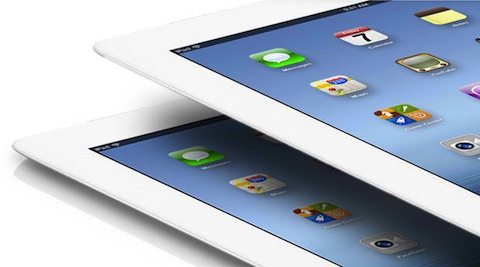
Why did I settle for iPad 2, and forego the new iPad — or iPad 3?

(Note: Apple is not calling the new third-generation iPad the iPad 3, but for purposes of this post and the discussions hereinafter, and to avoid confusion, I’ll refer to the third-generation iPad as the iPad 3.)

When I sold my iPad “Classic” back in June 2011, I had it then in my mind to just get the next version of the iPad. Thus, the delight when the iPad 3 was announced by Tim Cook last March 7, 2012 (or March 8 in the Philippines).

The major improvements (or changes) of the iPad 3 from the iPad 2 are:

  • Retina Display — capable of 2048-by-1536-pixel resolution at 264 pixels per inch (ppi);
  • New A5X Chip — same dual-core processor as the A5 chip of the iPad 2 but the upgrade comes in the quad-core graphics (vs. dual-core GPU);
  • iSight — 5-megapixel back camera;
  • 4G LTE connectivity — for faster cellular data browsing;

See detailed comparison at the Apple Store.

Before I took the plunge and got the iPad 2, I have watched the video reviews by The Verge and MacWorld. And from that, here are my impressions: Read further and tell me if I’m vindicated »

The Idea of an iPad Mini

Kyle Baxter breaks down the advantages vs. disadvantages of a smaller version of an iPad (e.g., a 7″ to 8″ display):

I have no doubt that Apple is working on a small iPad, but that’s a separate question of whether they will actually release it.

Personally, I don’t like the idea of an iPad Mini, iPad Nano, or whatever name. I’m not entertaining the idea of getting both, if there will ever be a smaller version. And I hate debating with myself which screen size should I get.

I’m already spending a lot of effort deciding whether I should get the new iPad (3rd Gen) or settle for iPad 2. And I’m already sick of deciding. So please put a stop at my agony.

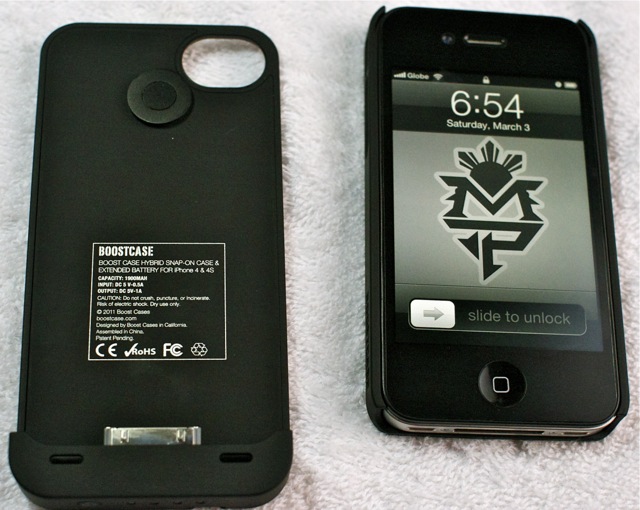
Boostcase Hybrid — a must buy for iPhone 4/4S users

After reading good reviews and buy recommendations about the Boostcase Hybrid from PTB, Abuggedlife, and Technograph, I finally gave it a go and bought one. Indeed, it is capable of doubling my iPhone’s battery life, especially when I’m nowhere near a power outlet, places other than the house or the office.

I’ve been to out-of-town trips where I found my iPhone’s battery dead (or almost dead) before the trip is over. These are the instances that the Boostcase battery pack could have proved very useful.

Don’t get me wrong, I consider the iPhone’s battery to be the most reliable and most consistent compared to say an Android (more on this in another post) and even BlackBerry. I mean I can install any new apps on the iPhone without worrying much about any additional strain on the battery, as compared to when using Android and BlackBerry. Of course, unlimited 3G use especially when using the Maps app can drain a lot of battery. Photos and my own impressions after the jump »

Spinning Beachball of Death on MacBook Pro (Spring 2011)

Since I upgraded my MacBook Pro to Mac OS X Lion, I often encountered the Spinning Beachball of Death, especially when the computer screen wakes up from automatic sleep after some period of time. This happened even either the computer is connected to a power outlet or not. I’ve tried quitting resource hog applications (I don’t use Photoshop, iMovie, Dreamweaver, etc. that much) like Firefox, Google Chrome, and even iTunes, but the spinning beachball just randomly occur — the most frequent would be once a day.

Waiting for the spinning beachball to resolve itself, to eventually disappear and get it back to its working condition is of no help. It’ll stay at that state unless I force shutdown the computer by holding down the power button.

It was already getting on my nerves so I decided to do a little research. Read further »

It’s More Fun in the Philippines Android App

If you were a fan of the new Department of Tourism slogan, “It’s More Fun in the Philippines”, and you own an Android device, then good news for you.

It's More Fun in the Philippines Android App screenshot

You may download the app, “It’s More Fun in the Philippines”, from the Android Market if you want to come up with something like this: Check out my sample photo »

Smart vs. Globe Battle on iPhone 4S

Unbox did actual tests of both networks on two iPhone 4S’s.

Truth is I’m not surprised at all by the results. Smart Communications beat Globe Telecom 8 times to nil. Based on my personal experience, Smart’s 3G network is usually faster as compared to Globe’s, even at the heart of the Ayala Center in Makati, which is supposedly Globe’s home turf. Nevertheless, I just hope Smart could/had broaden its 3G wireless network coverage to include my hometown, in Tigbauan, Iloilo, as I’ll be spending my time there during the coming holidays.

The Android UI Lag

Even for a dual-core 1.2GHz device like the Samsung Galaxy S II (SGS2), while running on Android 2.3 Gingerbread, I could still really tell the UI lag when scrolling, especially when compared to a single-core device like the iPhone 4.

Take for example the official Twitter app. While swiping your fingers from bottom to top to scroll through earlier tweets in your timeline, sometimes the scrolling would stop at the tweet you last put your fingers to, as if you were trying to select or tap on that particular tweet and not swipe through it. This happened so often it actually got so frustrating.

Andrew Munn has a very good explanation why this is so with any Android device: Read the explanation after the jump »

Instapaper for Android

After more than a month tinkering with my Android device, the Samsung Galaxy S II (SGS2), I’ve come to the conclusion that the one app I missed the most about my iPhone is Instapaper.

From the mail app, Evernote, Twitter (Tweetbot), Facebook, to Feeddler (Google Reader) apps, you can easily send articles to read later (and even offline) via Instapaper. Alternatives like ReadItLater are great, but seamless integration with various other apps are wanting, and some articles, although obviously blog posts themselves, are not loading properly in ReadItLater.

To a lot of people, owning a smartphone means a lot of games. I consider myself to not belong to that “lot of people”. The only games I have on my smartphones are those that are really quick games like, the usual suspects like Fruit Ninja, Fling, MasterCode, Flight Control, and some card games like Poker, to pass the time away while waiting for something or someone like in waiting areas of airports, clinics, offices, restaurants and meetings. Read Further »

Samsung pokes fun at iPhone fanboys

Samsung’s Galaxy S II ad: the next big thing is already here:

Jayvee posted:

This ad is spot on. It’s exactly the reaction I get from people who see the Galaxy S II. As I said in previous posts, the S II is the only phone that turns the heads of the fanboys.

I say, yes, this thing may have really got my head turned when I saw one at gadget stores. But having the first hand experience for exactly one month now, I must say I was a bit disappointed. Details about the experience to follow soon. Continue reading Samsung pokes fun at iPhone fanboys