Why I Bought a Kindle?

I used to own a first generation iPad, and I intend to get a replacement in the future. I currently own an iPhone. Both have (or at least used to have) the Kindle app. Likewise, I have Kindle applications installed in both my laptops.

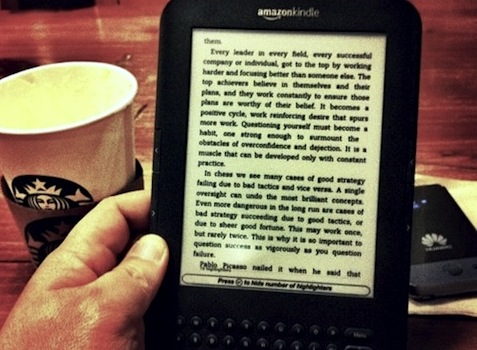
Last Saturday, I bought a Kindle Keyboard (see photo above) — the 3rd generation Wifi 6″ E-Ink display Kindle with Special Offers and Sponsored Screensavers.

Yet, the question that often pops up: Who needs a Kindle when you can read your e-books in your other existing mobile devices like the iPad?

First, let me just reiterate some “obvious” reasons — that which you’ll usually find in other blogs — why Kindle is better than the iPad to suit the bookworm in you: Carry on »

iPhone vs. BlackBerry

I own an iPhone 4 and recently — let’s just say — had a short affair with the BlackBerry Bold 9700. I know they’re not particularly the top of the line of their brands, taking into account that iPhone 5 may be announced in a couple of days.

So, this article is actually more about the hangups I had with my BlackBerry Bold 9700 experience as against that with the iPhone 4. Some points may not be applicable to other BlackBerry models like some touchscreen in the BB Torch line, but definitely some are very much relevant to all models.

First, let’s talk about what I liked about the BlackBerry:

  • Unified Inbox via the Messaging App. From Email, SMS, BBM message, Gtalk, Yahoo! Messenger, as well as Twitter and Facebook notifications — they are all there in one place. The Gtalk, YM, Twitter, and Facebook apps were developed by RIM (Research in Motion) itself, so they are seamlessly integrated into the Messaging app. The Messaging app also serves as the central notification center, which functionality is yet coming to iOS 5.
  • Longer Battery Life. As a second hand device, I still get more than two days of usage if Wifi is on (which I always use in the office and at home), and less than two days when it’s off (meaning I’m always on cellular data connection).

Quite a short list, really. Now let’s move on to where the BlackBerry is really getting into my nerves. This list is in random order, and as such may appear in whichever crosses my mind first: Continue Reading »

BeReader – Google Reader App for BlackBerry

When I’m out, in a coffee shop or somewhere, trying to kill time, I check my Twitter, Facebook, and of course Google Reader.

At first I thought I was glad there was a Google Reader client for BlackBerry — BeReader. But believe me, it just even added more to my disappointments about the device rather than impress me:

  • Too slow — no, very very slow!
  • US$ 9.99 for such a crappy app — no way!
  • You can’t select text nor click on links within the articles;
  • Navigating and switching between/among articles, feeds and/or folders (group of feeds) takes forever. Wait, did I already mention it was painstakingly slow?

By the way, I was using a BlackBerry Bold 9700.

300 MB is So Much for My Use

I’ve mentioned that I subscribed to Globe PowerSurf 299, which is 300 MB good for 30 days. I’ve also mentioned that I have wifi both at home and in the office.

Now 22 days have already passed and I have not used even half of the data usage I was allotted with. I’ve used so far 143.51 MB or 47.8%. I hope Globe Telecom could come up with a lower plan, say like 200 MB for a cheaper price.

UPDATE: Or perhaps, these PowerSurf plans are not for me at all. I have an iPhone 4 at plan 299, where I don’t have a use for that P299 credit (for I have an office-issued phone unlimited Globe-to-Globe). If I opt out of the PowerSurf 299, I could use that P299 credit for hit-and-run mobile browsing at P5 per 15-minutes.

I just hope that Globe instead have a per MB charging deductible from the regular plan. Or, better yet, carry on with the Powersurf plans but don’t charge it on top of the Monthly Service Fee (MSF). Charge it against the consumable amount instead.

Twitter is about Delivering the Message in 140 Characters

Twitter limits you to express your thoughts in 140 characters or less. It actually encourages (if not teaches) you to be more creative in delivering your message by limiting the number of characters — thus, the limited number of words — in each tweet. This is in fact in congruence with the declining attention span of users/readers/followers, especially with the vast amount of information available in this digital age.

With services like Twitlonger, Deck.ly and the likes, users are allowed to override this 140-character limitation by cutting the message into 140 characters but allow the inclusion of a link that points to a page containing the full message (besides advertisements). These services are even integrated in apps like UberSocial and Tweetdeck. See how it defeats the purpose »

How Do You Use Your Smartphones?

I use my Sony PS3 game console for playing video games; my 32″ LCD TV + DVD Player or media player for watching movies and TV series; my personal computer and/or mac for personal computing like spreadsheets, word processing, media-editing, browsing flash-heavy websites, etc.; my Canon 30D DSLR for photography; and my smartphone/s for mobile computing, communications (e.g., calling, SMS and email, IM), on-the-go social networking, and some light internet browsing.

That being said, I don’t use my smartphone primarily as (or as an eligible alternative for a great) game console, movie player, personal computer, or camera. Furthermore, if all you do is texting and calling for a phone, you don’t need a shiny new smartphone.

Amazon Kindle Tablet

The coming of the Amazon Kindle Tablet it seems is inevitable, at least according to Techcrunch. It’ll be running on a highly customized version of Android. The best part– it’ll be priced at only $250 for the 7-inch version.

I do hope that the Amazon Kindle Tablet will be a hit. That way, my other wishes:

  • That the other Android tablet makers will realize that they have to sell their Android tablets at a price range way lower than the iPad in order to truly compete with the iPad; and
  • That Amazon will drop further the prices of the original Kindles with the e-ink display — because I really love to buy one;

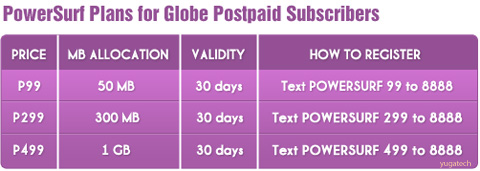
Globe Powersurf Plans 50MB for P99 Per Month

I told you so. Globe Telecom will come up with its own new pricing schemes to compete with Smart’s ‘Always On’ plans. And here it is:

Indeed Globe came up with a more competitive pricing. To compare the two, Globe offers 1GB for P499 vs. Smart at P750. Continue reading »

Facebook Messenger – a Free Mobile Messaging App

Facebook has just made available a free stand-alone messaging app for your mobile phone. It will be like BlackBerry’s BBM service, or WhatsApp, or Kik, or LiveProfile, or PingChat!, but that you don’t need an additional ID, as all your contacts in Facebook will be available for messaging, may they be using the app as well, or just in any other mobile device, or the web.

Get and send messages fast

With the new standalone Messenger app, now messaging with friends is faster than ever. Messages are delivered instantly, and they’re always just a click away.

Source

Unfortunately, it’s only available (yet!) for iOS and Android (have I already told you about the developers’ preference in developing mobile apps?), and for iOS it’s only available as of the moment in the US iTunes store. Continue reading Facebook Messenger – a Free Mobile Messaging App

Globe Recommendation: SuperSurf

Took this Globe Telecom’s internet surfing profiler to determine which of Globe’s internet plans is best for me according to my data requirements, habits and/or usage. And the result: Globe recommends I subscribe to their SuperSurf plan.

After all I thought Globe has got a lot of options suited for me, and all they could come up was the ultimate SuperSurf plan! Continue Reading »