WordPress 3.0 “Thelonious” is Here!

The moment we WordPress users have been waiting for has finally come — the release of WordPress 3.0 codenamed Thelonious. Deuts.NET is of course already upgraded to the latest version.

Watch this video to know more about the new features of WordPress 3.0.

[wpvideo BQtfIEY1 w=400 h=224]

So far, the list of new great features we’re most excited about and would love to employ in this blog (and other blog projects as well) are:

  • A new default theme, called Twenty-Ten, paves the way to be an example on how to take advantage of the new features;
  • Custom background support lets you easily enable your heavily customized theme to support custom backgrounds and custom headers. Moreover, you can assign further custom headers for each post;
  • Multi-site Capabilities and WPMU Codebase Merge is probably is the main feature of this new release. I hope to turn this blog into a multi-site one and utilizing the domain mapping plugin would probably consolidate my other projects into one big Deuts Network site;
  • Custom Post Types reduces the need to fiddle around with custom fields. This brings WordPress to be much more of a CMS.

Some other features are, well, add to the bloat. We’ll just continue to wish for the development team to develop a WordPress Core only and that other features can be easily turned on or off.

Windows Mobile 6.5 and the Automatic Data Connection

I have a Samsung Omnia Pro B7330, a Windows smartphone (non-touchscreen) running on Windows Mobile (WinMo) 6.5. What’s one thing I hate about it is that some programs running in the background are actually using data connections without my prior intervention–i.e., without me actually initializing them.

I have installed the SPB Wireless Monitor to monitor which programs have actually invoked the use of the data connection, and at what time were data connectivity used. I discovered the following are some of the programs that were started and used data beyond my control:

  • gpsdriver.dll
  • rilgsm.dll
  • dhcp.dll
  • system
  • home.exe
  • WINDIAG.dll

They actually used minimal data, just a few KB and most are less than 1Kb, but were connecting at different times or intervals during the day. I find this not a problem if I’m using Globe’s per KB charging. But I totally switched to TIME browsing since I really need to download some emails and attachments while on the go–that which I’ll be charged based on a per 15-minute interval.

I’m not actually sure which one is causing this problem, either my particular phone unit or WinMo 6.5 itself. Nevertheless, if I don’t have the control over when these programs or processes run and use the data connection, that means I won’t have the control over my courier charges as well. There has got to be a way, which fortunately I found from this forum post: Tip: Disable Data Windows Mobile 6.5 (Disable 3G & GPRS).

The solution (which should apply to any Windows Mobile 6.5 and even previous versions):

  1. Create a new connection. Under Settings>>Connections>>GPRS>>Create New. Connects to “The Internet”. You can leave the “Access point” and other settings blank. We can also call this connection “Disable Data”;
  2. Use the connection “Disable Data” when we don’t want the phone connected to the internet via GPRS/3G. Under Settings>>Connections, click on Menu and select Advanced. Internet connection should be set to “Disable Data”;
  3. Use the regular connection when we need the access to internet. In No. 2 above, after selecting Advanced, select the regular connection for the label “Internet Connection”. For Globe subscribers this should be “myGlobe Internet”.

I know this is a bit tedious process that requires additional steps to start connecting to the internet using the data connection, unlike when I was yet using a Nokia E51 phone wherein unless internet connection is actually invoked, no data charges are incurred. But this is the only workaround so far I found. Hope this post help all other WinMo users as well.

For questions and comments, feel free to lodge them below.

Chyrp: All Good Things Come to End

UPDATE: Chyrp has been revived, and version 2.1 has been released.

Chyrp is a blogging engine designed to be very lightweight while retaining functionality. It is powered by PHP and has very powerful theme and extension engines, so you can personalize it however you want.

This is what was used to be contained in the official website of Chyrp, before it actually became unavailable.

Chyrp basically is a lightweight tumblelogging engine based on PHP and MySql. It’s a tumblelogging just like Tumblr that you can install in your own server. It’s lightweight in the sense that basically the essential or core functions are installed out of the box, to minimize use of server resources and space. I used to install it in some of my projects just to post short snippets of text, photos, audios, videos, quotes and links.

However, just two days ago, the main developer, Alex Suraci, in the Chyrp blog, posted an out of ordinary news: Chyrp is Dead; Long Live Chyrp.

As you may have noticed, progress on Chyrp has grinded to a halt, and has been in that state for a long while now. It is no longer maintained. A few people have volunteered to step in, which I appreciate, but no progress has been made. Throughout this project’s timeline I can count the repeated contributors on one hand (whom I am eternally grateful for; Twig, a lot of internal refactoring, and many fixes are the result of their hard work). It’s unhealthy for a project to rely too much on one maintainer; when they lose interest the whole thing crumbles down. This is essentially what’s happened. People keep switching to, finding, or using Chyrp, which just isn’t a good idea for me to encourage given Chyrp’s current state. So now I’m announcing it’s death.

Chyrp will always be available at GitHub. Any contributors can feel free to fork my repository; I’d be more than happy to accept patches and security fixes, or add you as a committer if you seem trustworthy and active enough. But I will no longer be working on this project, I probably won’t be in the IRC channel anymore, and I can no longer guarantee that this site will stick around through server moves and such. Unless a miracle happens and Chyrp development springs from the grave (which will be judged by actions, not words).

Chyrp has been a part of my life since I first learned to program. It grew out of what is now a “hello world”: writing a blog engine. It has spanned a decent chunk of my critically-thinking life. Thanks for being a part of this project, whether you were a user or a contributor.

We, the users of this great web application (other than WordPress, of course), are saddened by this news. We would have rather see Chyrp through till the end than witness its untimely demise. What happens now to my current projects that use Chyrp? Well, maybe I’ll just continue with the latest version and pray that it is not hacked.

UPDATE: Chyrp has been revived, and version 2.1 has been released.

In the World of Smartphones, We Are But Just Fourth Class Citizens

It’s sad to say, but, in the world of smartphones, we — the Windows Mobile phone owners, are but just fourth class citizens.

When it comes to great games and useful utility applications for smartphones, it appears, according to my observation, that developers develop apps in the following order or priority or hierarchy:

  1. iPhone
  2. BlackBerry
  3. Android
  4. Windows Mobile
  5. Symbian S60
  6. Others

Continue reading In the World of Smartphones, We Are But Just Fourth Class Citizens

Gmail Rolls Out Google Buzz; Check Out What’s in Store For Everyone

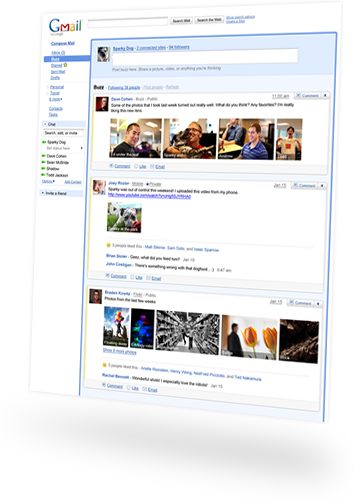
Here’s another great reason why you should love and totally switch (if you haven’t yet) to Gmail. They’ve recently rolled out their newest service, the Google Buzz. (By the way, Google is gradually rolling out Buzz to everyone, so if you don’t see it in your Gmail account yet, check back soon.)

Google Buzz Landing Preview

It’s basically like Twitter, but actually better. It allows comments, likes, email. It resides right within your Gmail web interface. All you need is a Gmail account. Of course, your friends should be using Gmail the same in order for you to share thoughts, quotes, links, photos, and videos with each other.

Photos and videos are displayed inline, so you don’t have to open another window or tab. Sharing can be done publicly (and displayed to your Google profile page) or privately to a group of people or close friends only.

Comments get sent right to your inbox so it’s easy to keep up with the conversation. Of course, you can mute a certain thread in case you find your inbox full of non-sense.

Continue reading Gmail Rolls Out Google Buzz; Check Out What’s in Store For Everyone

Luminotes is Closing; Download the Windows Stand-Alone Application

It’s a sad moment for the techie world and wiki fans. The hosted service of Luminotes is closing, and you can access, export, and backup your notes from their servers until March 1, 2010 only.

According to their blog:

Luminotes.com will shut down on March 1, 2010. At that time, you will no longer be able to view or edit any notes hosted at Luminotes.com, and no further releases nor support for any Luminotes products will be available.

But of course their Windows Stand-Alone Applications — Luminotes Desktop — is out in the wild. In case the website totally shuts down after the time (March 1) and you missed to save yourself a copy of the exe file, I have a backup copy: Luminotes.exe (download). Readme file is available upon install.

POP3 Access for Yahoo! Mail Free Accounts

A POP3 access allows you to send and receive your email messages from a desktop email client like Microsoft Outlook, Thunderbird, Entourage, etc. A user need not login to the web interface and face hundreds of banner ads everyday, but just wait till the program fetches the mails from the background.

POP3 access (and even IMAP) has always been free when you’re using a GMail account. However, by default, for Yahoo! Mail, you will need to upgrade to at least the Yahoo! Mail Plus account (yes, you have to pay in this case) in order to avail of the POP3 access.

Fortunately, there is a workaround for this: YPOPs! Continue reading POP3 Access for Yahoo! Mail Free Accounts

Expanding WordPress Mu Functionality with Premium Plugins

For the longest time, I have been planning to build not just a website for my college organization but also a community where our fellow members can hangout and meet and greet each other while in the world wide web. I find WordPress Mu could most probably deliver at what our requirements for a functional social networking site, especially when coupled with cross login details functionality offered by BbPress and BuddyPress.

With WPMU Dev Premium account, I could possibly enhance further the functionality of the site. With 100 more plugins, themes, videos, etc. at my disposal, the possibilities are limitless. And they are constantly maintained, so you’ll be assured that they work with the latest versions of WordPress Mu, BbPress, and BuddyPress. Continue reading Expanding WordPress Mu Functionality with Premium Plugins

Create A Custom Font Style Based on Your Own Handwriting

If you are like me who’s proud of your own handwriting, no matter how bad it is, or if you’re a person who wants to experiment with the different font faces for letters and numbers, the you may want to create your own font style based on your unique handwriting.

Here’s a screenshot of my handwriting typed in MS Word using the custom font style I named “deuts-print“.

Deuts Print Font Sample (Click image to enlarge)

Continue reading Create A Custom Font Style Based on Your Own Handwriting

Symbian Nokia: Enhancing Speed and Performance

The Nokia E51 with the Symbian S60 Operating SystemWe have heard and read a lot about optimizing your computer performance and enhance speed in the process. But what about mobile phones? We, in one way or another, do sometimes are affected with lagging phone software processing.

Just like desktop computers, mobile phones do have operating systems (OS) as well. In the high-end Nokia phones, they’re running on Symbian S60. Then there’s Windows Mobile, Android, Blackberry OS and iPhone OS to name some of the other OS’s.

And just like in desktop computers, there are tricks as well to optimize your mobile phones’ performance. Smartin enumerated some tips on “How to Speed Up Nokia Phones with Symbian Mobile OS“, namely:

  • Install firmware update with care
  • Speed up Nokia phone with software
  • Remove unnecessary applications
  • Kill background running and autostart apps
  • Use default themes

Continue reading Symbian Nokia: Enhancing Speed and Performance