Android, iPhone4, and Windows Phone 7, Which Grills Fast?

Warning: the video below contains scenes that may not be so totally acceptable to the faint of heart geeks.

This video is a marketing campaign for the EZGrill disposable grill. I know the idea is not original, as we’ve seen videos like “Will it Blend?” before. Yet, they got our attention just the same.

Who wouldn’t when these people are burning some iPhone4, Android G2, and a Windows Phone 7 HTC Surround:

[youtube http://www.youtube.com/watch?v=Gm0AkFUYpLQ&fs=1&hl=en_US&color1=0x3a3a3a&color2=0x999999]

The Android G2 went out first, followed by the iPhone4, and the HTC Surround lasted the longest.

We could only wish they gave any one of them to us instead.

Toodledo for Windows Desktop

I’m thinking about shifting from RememberTheMilk (RTM) to Toodledo. That’s because I’m trying to lean towards using a GTD solution to my everyday tasks, may they be personal or business.

I find Toodledo to be close to perfect, if not perfect, for GTD. If RTM only has tags to categorize your tasks, Toodledo has tags, context and projects/folders. Of course both have priorities.

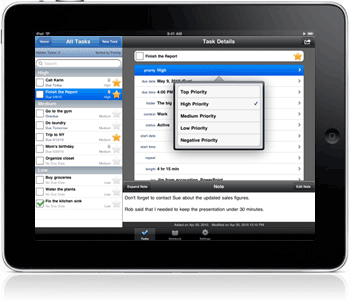
But I’m starting to like Toodledo more because of its great iPad app and its integration with Nuevasync (to synchronize my tasks with my Windows Mobile phone).

Unfortunately, Toodledo has no native Desktop PC application. I’m not a programmer, much less a software developer, but now I’m wondering, if the developers could afford a great iPad app, why not develop one for Windows PC? If it’s Flash-based or will be running on Adobe Air, I wouldn’t mind. The most important thing here is it can be accessed offline and seamless synchronization with the web service once you get online.

I know there’s Task Angel, but that you have to pay quite a hefty amount in order to use it. And it’s not native. It was not built to integrate with Toodledo alone. And it lacks Notebook support too. I’m really talking about an iPad-like application.

Hope the developers consider my request in the future.

Who Wants to Play Tongits?

Tongits (or Tong-its) is a three-player card game using a standard Anglo-American deck of 52 cards (without jokers). It’s knock rummy game that has become popular in the Phillipines in recent years.

Just like any other challenging card games, what makes Tongits truly enjoyable to play is that winning and losing (after a series of deals) does not totally depend on pure luck. In fact, besides luck you also need to possess a set of skills, among others — mathematical, memory, bluffing, guts, timing, etc., to come out a winner.

This article is not about how to play this card game. Instead, this is about a computer program that somehow knows how to play it, and can actually play it quite well.

Although the game requires three (and only three) players, you can actually download and install this program in order to play Tongits on your own (against two other computer players).

The official website summarizes the features well enough:

  • Drag & Drop Interface. The game feels like the real thing with its intuitive drag & drop interface.
  • Realistic And Challenging AI. The computers play like live human tongits players.
  • Innovative Way of Organizing Cards. Just like in the real game, you are free to group and organize cards in any way you like. This significantly improves your planning and strategy.
  • Betting Simulation. Betting enhances the realistic feel of the game. It adds excitement and suspense and gives the player a sense of accomplishment and progress.
  • Game Saving. The game is automatically saved after each round to preserve the precious progress you have made.
  • Statistics. Relevant game statistics such as number of wins and money won, are saved for each player.
  • Clear Card Images. The cards were designed to be easy to read and identify. This helps you easily spot important cards that you might need to win the game.
  • A Solid Trainer. If you are a professional Tongits player, the game can supplement your training. And with the high level AI, you won’t need human opponents to practice with.
  • Continuous Development. The game is continuously being developed and improved to further enhance the player’s experience.

Being built on Adobe Air, this application ensures compatibility with multi-systems including Linux and iOS. Plus, it allows playing through the browser.

The AI could be challenging, as according to the website, but not challenging enough. It’s just so easy to win against the computer players. Here are the reasons why (the way the computer plays):

  • It’s very much predictable when it calls draw. It doesn’t bluff. I believe it calls draw anytime its cards point total less than 20 at any stage of the game;
  • It calls chow even when what at his hand is already a set. For example, you throw a queen at it, it calls chow with three other queens from its hand, ignoring opportunities to form more sets from the “undrawn” stock of cards;
  • It calls “draw” even if the other player has only one card left. This is I guess the effect of it calling draw anytime its hand’s point totals less than 20. Think about it, the fact that the other player has only one remaining card and the last card it/he/she threw or discarded was a three, then the remaining could only more likely be an ace or a two. Yet, it calls draw even if its point total is, say, nine;
  • It lays down its cards prematurely–not to avoid “burn” at all. As soon as it gets a set at his hand, it lays it down immediately, allowing other players to get rid of some of their cards early by laying them off (sapaw) to the cards the former laid down;
  • It challenges nevertheless. It never bluffs, that’s one case. It challenges however its hand look like or count, that’s another. You as the only human player can’t even call a bluff against the computer players, because they will always challenge your call.
  • It sometimes miss a lay off (sapaw). Yes, after playing a number of games, I noted some instances where it missed a sapaw;
  • Patience is a virtue. It does not wait for a straight (flash) currently laid down to continue, before throwing away or discarding its possible continuation card/s;

Well, despite of these lack in the AI, the computer game is always fun to play. After all, who doesn’t like winning, right? If you are a seasoned tong-its player, you’ll never lose against these computer players.

Oh, I have to warn you. This program is a available for 10 free trials. That is, it allows you to click on the “Play Tong-its” button 10 times and play the game before it forces you to upgrade in order to play further. The upgrade price is a meager US$ 5.00 anyway — I guess worthy enough for a total winning satisfaction. 😀

Gmail Conversation View On and Off

One of the great features of Google’s Gmail is its conversation or threaded view, which groups topics together, to enable the user to review at one glance how the conversation went through.

However, after about five years of enjoying this feature from Gmail, I’ve found some loopholes about it. When searching for a particular message, for example, that you either received or sent (the search function, by the way, within Gmail is yet another powerful feature that I love), you sometimes find yourself scrounging through long conversations to find that specific message or attachment that you needed.

And this is where this new option comes in handy.

Now you can turn the conversation view on and off from the settings page.

Got a suggestion, though, to the Gmail developers. Wish this option is just a click away, instead of embedding the same among the many options in the general settings, just like the quick options for turning chat on/off, google buzz on/off, older contact manager, and basic HTML at the bottom of the page (see below):

Twitter’s OAuth Authentication, Twikini, and Windows Mobile

As early as April this year, Twitter announced that it will drop third party applications’ authentication other than OAuth to connect to Twitter, and it happened in September 1, 2010. That means that authentication methods like keying in your username and password will not work anymore.

The OAuth method means that in order to use a desktop, mobile or online application to interface with Twitter, you will need to click a link that will bring you to the Twitter page (see sample screenshot below) to authorize the connection.

Examples of desktop applications are Tweetdeck, Seesmic, Twhirl, etc. Examples of online applications are Twitter on Facebook, Friendfeed, Twitpic, and even the various WordPress plugins. For Mobile phone, well, there are different applications for each operating system (e.g., iOS, Android, BlackBerry’s RIM, Windows Mobile, Symbian, etc.).

I have read or heard from various blogs about Twitter’s absolute use of OAuth authentication. But I ignored it, thinking that I don’t develop twitter applications and so that should really be least of my concerns.

Until now, when I found out that I couldn’t use my Twitter app for Windows Mobile, Twikini, anymore.

Twikini

Twikini is a Windows Mobile client for Twitter. It’s actually one of my favorite WinMo Apps that I paid $4.95 for it to the developers, Trinket Software. It’s lean and fast, just as the developers describe:

FAST! Unlike other Twitter apps for Windows® Mobile, Twikini is written entirely in native C++ code for maximum performance and the fastest load time possible.

The software I paid for comes with free future upgrades, should there be any. Actually, without further upgrades, that latest version of Twikini I installed was already fully functional in its own right. There were a few bugs but ignorable, which usually only occur when there are connection issues.

However, starting September 1, I discovered I couldn’t open Twikini anymore, and it kept asking for my Twitter login credentials. I supplied the correct username and password –yes, but nothing is doing right. Then I read around and it has got to be because of Twitter’s new authentication policy.

And the worst thing about it is Trinket Software already stopped updating the software for my version (6.5) of Windows Mobile.

Sorry guys, with the shape WM 6.x is in, we've moved on to other projects. Twikini will be back on WP7.

Pls note: Twikini will likely stop working later this month (see http://www.countdowntooauth.com). No further updates are planned.

Now, ain’t that great? I paid for a software thinking it comes cheap for a fully functional Twitter application, when it was actually worthless to begin with. I felt like I was robbed by Twinket Software with a few dollars by selling me trash.

The Blame Game

Yet, at the end of the day, Twikini stopped working to connect to Twitter in Windows Mobile. Who’s really to blame?

On one hand is Twinket Software, the developer of Twikini, for reasons discussed above. On the second is Twitter for dropping authentication methods other than Oauth. The third and the last, Windows Mobile, for being abandoned by users and application developers alike.

More related readings about Twikini and Twitter’s OAuth

The Easiest Way to Install WordPress and Other Web Applications

If you are like me who keeps installing WordPress from time to time, to accommodate various projects, then this simple tool would probably fit the bill.

Instant Install explains how this works:

Just upload our tiny PHP installer to your server where you want the app installed, load the file in your web browser, choose an app and follow the instructions.

Once you’ve selected an app, our installer then downloads and extracts it to your server and then forwards your browser to the setup.

There are other utilities for auto-installing WordPress like Cpanel’s Fantastico and Bluehost’s SimpleScripts. The matter is: the former is hard to customize and does not always carry the latest version of the software, while the latter is a paid service unless you are a Bluehost subscriber.

I have tried installing WordPress using this script, and the installation was a breeze. You just have to be ready with the database, the database user credentials, and your login information.

I have not tried installing other apps, but the website tells us it can likewise automate installing (in so far) the following applications:

CCTV Cameras and Security

The use of CCTV camera is a detective form of security. It isn’t as effective as the preventive ones like putting up security guards in the premises to secure the area or perimeter from unauthorized entries (and exit). It only allows you to review and take action AFTER the wrong has been done.

That’s why putting up CCTV cameras alone will not ensure security of your office or building. They do require the attentiveness and skepticism on the part especially of the lobby guards.

Videos from these cameras can only be used to identify the culprit. That is, if the culprit is from the same building at all. What if he/she were a total stranger, just like in the video below.

This video was recorded from our company’s CCTV camera, which faces the office door fronting that of our neighbor’s.

[youtube http://www.youtube.com/watch?v=SJftoBNtccE&fs=1&hl=en_US&rel=0&color1=0x3a3a3a&color2=0x999999]

CCTV cameras ensure that you have a record of any crime that happened. Certainly, they do not prevent crime from happening.

Cherry Mobile D15 Meets Half of My Expectations

I was recently looking for a good backup phone. I was scrounging through some of the China phone models from Cherry Mobile, Torque and MyPhone. My initial criteria for a good backup phone were:

  • Dual sim (i.e., dual standby);
  • A good battery life (despite the dual sim capability);
  • Less bells and whistles – to support the long battery life;
  • Sleek, sturdy and small — that puts Qwerty phones out of the question (I already had a Qwerty phone);
  • A sub-P2K price;

[adsense250]

Having these in mind, I settled for the Cherry Mobile D15, features of which include:

  • Dual SIM / Dual Standby;
  • Camera;
  • FM Radio;
  • MP3 / Video Player;
  • Flashlight;
  • Micro SD Card up to 2GB;

At a price of P1,999, I guess the extra features (on top of my minimum requirements) including the FM Radio and MP3/Video Player make CM D15 worth it. And these features are basically what make up the pros.

Now, for the cons:

  • Meager battery life performance. That’s 3days for light use, 2 for moderate, and 1 for heavy use before recharging. It may be acceptable to many, but not for me who have experienced using the small and sturdy Nokia 1202 (the latter could last me 2 weeks on light use);

    UPDATE: Turning off one of the sims improved battery life dramatically. It took me 5-6 days before recharging when only 1 sim is active.

  • The keys are a little bit on the hard side;
  • Typing a message is faster than reading what you have typed. If you type real fast into its numeric keypad, you have to wait a bit for the screen to actually display your message;
  • Volume during mp3 playback is not adjustable;
  • Substandard voice-call-audio quality. Volume for voice calls are adjustable, yes. But the sound quality–it’s like listening from a tin can;
  • A headphone jack that often fails to lock into position;
  • An FM Radio where radio networks battle over one frequency. You tune-in to one station (that’s “spot on” in its digital frequency dial), and you’ll hear two network programs fighting for your attention;
  • The OS is proprietary, which I think is not optimized at all to extend battery life before recharging;
  • Picture quality of the camera, in a rate of 1 to 10, is 1;
  • The body is built of almost (if not all) plastic. But then, that’s what makes it lightweight;

Conclusion

I’m not one of those people who hop from one blog to another just to bash about the cheap cellphones’ lack of this and that “loser” features. Why look for a cheap phone when the features you really want don’t come cheap to begin with?

As the cliche goes “you get what you pay for”.

As for me, I’m half-satisfied with my purchase. At least I have my dual-sim phone and I intend to push it to its limits. For its price, I wouldn’t mind if it won’t get me even a year of extreme usage.

The upcoming release of the dual-sim phone from Nokia (the Nokia C1 or C2) is a welcome development. Hope it comes with the *needed* long battery life just like the Nokia 1202 and within the same price range.

P.S. Another insightful review of the Cherry Mobile D15: A good phone is a useful one: the Cherry Mobile D15.

Auto Zip Attachments Extension for Thunderbird 3.0

UPDATE: I have updated the extension to support the current version of Thunderbird (version 3.1).

What makes Thunderbird (TB) a kick-ass desktop mail client is its flexibility that makes it extensible through various addons/extensions and plugins.

One of my favorite extensions since TB1.5 was the Auto Zip Attachments, which automatically compresses (zip) attachments on-the-fly. This is especially useful for email messages sent with MS Excel or Word format attachments, wherein compression ratio are usually high. No more need to manually zip the files from the file explorer before attaching the same to email to save on bandwidth, which likewise translates to speedier file transfer.

Unfortunately, the developers of this extension appear to have forgotten about it and failed to update the same to keep it abreast of the new and more robust Thunderbird 3.0. It’s only compatible upto TB2.0. It seems that changing the max version in the install.rdf file is not enough. Instead, it involves editing further another file deep into the .xpi file, as described in one of the reviews for this extension.

Following the instructions from the reviews/comments on how to edit the .xpi file to make it compatible with TB3, I successfully installed the Auto Zip Attachments extension into my own TB install. I took the liberty to make that modified extension available here for everybody’s consumption. Download link below:

Download and unzip the file, then install to your TB3 desktop client. Would appreciate feedbacks for any problems or issues encountered. Hope we enjoy Thunderbird 3.0 more with this extension.

Migrating from Tumblr to WordPress

Don’t get me wrong, Tumblr is great. But with my so many experience with the different blogging engine and even other CMS’s, I always find myself going back to realizing that WordPress is way better.

It had been said many times that it is very important to choose the right blogging platform from the very start. But what do you do when you find yourself making the same mistake as others when they started out their blog?

Here are two ways you can import your posts from Tumblr to WordPress. For purposes of our test, I had more than 1,300 posts at my Tumblr blog that I tried migrating.

Tumblr2WordPress Utility

The process basically involves visiting the utility page over at benapps.net, key in your tumblr url, tweak some settings, and download the WXR (WordPress eXtended Rss) file (in .xml extension) —which by the way is the same format when you export a WordPress blog.

Then heading over to the WordPress blog you want to migrate your posts into, you would import the same just as you would a regular WordPress WXR file.

The results:

  • 1,218 posts were successfully imported, that leaves me missing with more than 100 posts — more or less 90% successful import;
  • As expected, comments were not imported. But that is something we can have a work around later with the Disqus plugin for WordPress (I was using Disqus as well in my Tumblr blog);
  • Posts like photos, audio and videos (which don’t really have post titles by Tumblr standard) have blank titles — that leaves too many polishing yet to be done;
  • Media are still hosted at Tumblr — media files weren’t imported;
  • Tags are properly reflected in the new WordPress blog;
  • WordPress can very well handle post redirection from the original Tumblr permalink structure;

The Posterous Route

If you have not yet known, Posterous has a feature that can import your whole Tumblr blog. On the other hand, WordPress.com has a feature to import from a Posterous blog. Using this route, and the same Tumblr numbers from above, we have noted:

  • Only around 700 posts were successfully imported — a dismal 50% turnout;
  • Comments were not as well imported;
  • Posts like photos, audio and videos (which don’t really have post titles by Tumblr standard) have common post titles, i.e., “Untitled” — that leaves much more polishing to be done;
  • Media files were actually imported into WordPress.com servers;
  • Actual tags were not imported. Instead, posts were categorized accordingly as Photo, Audio, Video, etc.
  • A new permalink structure, different than the original Tumblr structure that included post ID’s — this would surely lead to bad links;

Conclusion

So far, these two are the only viable solution to migrating from Tumblr to WordPress. Either way can be a pain, especially if you already have a huge blog at Tumblr. Either way, you pay a price for not starting out with the right blogging platform — charge to experience. But in the end of the day, you have to do it if you really need to.

We just hope someday there’ll be a better and smoother solution to help us Tumblr users out migrating to WordPress.