Kindle Keyboard (3rd Gen) Stuck in USB Drive Mode

One day, my Kindle Keyboard came out of the bag with its screen showing that it’s in USB Drive Mode:

Kindle Keyboard Stuck in USB Drive Mode

Note that it’s not connected via USB to power socket or computer whatsoever. Connecting the device, however, to the computer, either in a Mac or PC, the computer cannot recognize the device. It’s not in the ‘My Computer’ nor in the Finder. Contune Reading »

ETF’s coming soon to the Philippine Market?

BusinessWorld reports ‘SEC completes draft measure for exchange-traded funds‘. SEC is then moving to solicit public comments before finalizing the measure.

I have always welcomed the idea of ETF’s (Exchange Traded Funds) in the local bourse. Think about it, no more minimum holding periods nor sales load to worry about when buying and selling ETF stocks in the local stock exchange, except of course for the usual minimal fees and taxes.

In my opinion, this is a more liquid type of investment than regular mutual funds or UITF’s in a sense that you can sell your shares anytime without worrying about minimum holding periods and their corresponding charges. Besides, this is still a managed fund, thus you need not devote any more time in research for stocks to pick.

You might also want to read the 5 Things You Need to Know About Exchange Traded Funds.

Comparing Mutual Fund Returns

There are a lot of resources, particularly blogs, that compare returns from different types of Mutual Funds, and even UITF’s (Unit Investment Trust Funds), over different time periods. For example, try reading ‘The Best Performing Mutual Funds In The Last 3-5 Years‘.

Reviewing these numbers before investing to a new fund is a good exercise for it will give you better perspective at which fund you want to bet your money on. These return numbers are a “look back” at how the funds were managed, and thus performed, in the last 3 or 5 years. Continue reading Comparing Mutual Fund Returns

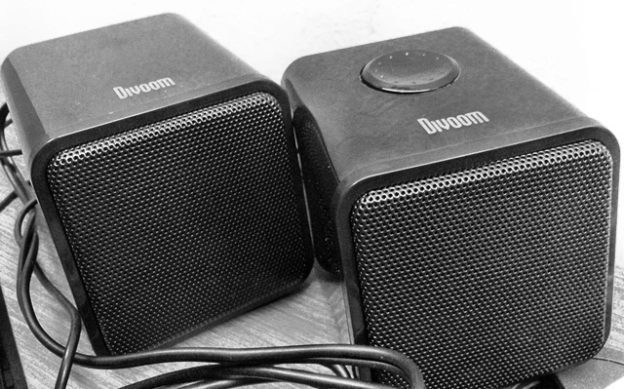
The Divoom Iris-02 Speaker System Review

I have been looking for an inexpensive (i.e., sub-Php1,000) portable speaker system for office use that could deliver soft audible music when played during office hours, but could also deliver loud-enough audio for everybody to enjoy tracks after office hours.

Then, I happened to bump into this Divoom Iris-02 at Switch in Park Square 1.

The speakers were small they can easily fit in your bag, and yet can deliver a level of sound loud enough they can startle everyone in the office if dialed to full volume. They are powered by USB, so they can deliver up to 10 times as loud the sound of normal built-in laptop speakers.

The speakers have no subwoofer, so they can’t really replicate the sound of a true stereo system. But then, you are not in a party, instead in an office trying to enjoy music while being ‘busy’ at work.

The official product page provides the complete features and specifications as follows: See the features and specifications after the break »

Market Talk on Stock Investing

Absolute Traders produced a video interview with Jay Peñaflor, PSE Head of Market Education, to discuss stock investing, comparing it to fixed income investments, the PSE Trade, and tips on stock investing. You may watch the videos below.

What I really find interesting is the second video focusing on the PSE Trade system, which has the capability to allow trading of other investment instruments in the future like derivative instruments and even commodities. But what really looks more promising to me is the possibility to buy and sell ETF’s or Exchange Traded Funds.

Watch more videos »

Pacquiao vs. Mayweather — The Fight is Finally On!

We know very well who will win in this epic but future (i.e., if it ever happens at all) battle between Manny Pacquiao and Floyd Mayweather. But the question is — how?

Well, just enjoy the video below:

This stop-motion video was produced by GRNMNGO, which took them 4 months and more than 2,500 still images to make. Wish they just used a clear white background instead or some other wallpapers.

This is how it feels like scrolling through a window in Android

For purposes of this illustration, I used a Samsung Galaxy S II (SGS2) running on Android 4.0.3 Ice Cream Sandwich (ICS) and the official Twitter app for Android version 3.2.2.

When Samsung introduced the SGS2 last year, they promised amazing speeds with its 1.2 GHz dual-core processor. But then, obviously, this video is a testament at how hiccups happen brought about more likely by the ever-famous Android UI lag. Look at how the scrolling abruptly stops to open the details of a tweet when you mean it to continue scroll up.

Although I sampled only a single app for this demonstration, it is in fact fairly representative of the whole Android experience — that in Android, the system responds to presses that were never intended in the first place.

Direct Messages (DM) in Twitter apps

‘Direct Messages’ in Twitter is as important as ‘Mentions’, yet it does not enjoy the same conspicuousness to facilitate quick access as the latter in the official iOS and Android apps.

In order to get to the Direct Messages section you need to go to Me >> and then Direct Messages. If you are new to the app, you might not be able to find it at all.

Good thing there are a lot of better alternative Twitter apps for iOS devices, case in point: Tweetbot, that give as much importance to Direct Messages.

As for Android users, well, good luck with finding a really good Twitter client alternative in the first place. Otherwise, you’re stuck with the official Twitter app.

When Twitter’s ‘t.co’ Expands Rather Than Shortens Links

In the beginning, people flocked to Twitter because of its one simple but great feature: to publish each thought or message in 140 characters. In some instances that feature proved to be a constraint, but that’s really where creativity comes into play. While sharing links, long URL’s[1. URL stands for Uniform Resource Locator, which is usually the permanent link you find in your browser’s address bar when browsing the web.] posed even more challenges. That’s when URL shorteners came into being, Tinyurl was one of the first (if not the first) of its kind.

Then on June 2011, Twitter rolled out its very own (and) automatic link shortening feature/service — t.co. The “root” domain name itself is limited to only 4 characters (including the dot) so it sure could produce shorter links. In its blog post, Twitter promised links as short as 19 total characters (including the ‘http://‘ prefix).

The good thing about t.co is that link shortening is automatic. There’s no need anymore to go to the website of the URL shortening service, convert the link to its shortened form and pasting the same to Twitter. Instead, just paste any URL, regardless of length, to your Twitter post, and that will only eventually cost you 19 or 20 characters from expressing the complete message. Continue Reading »

SugarSync – A Cloud Service with No Search Functionality

If you are a cloud service to backup, access, sync and share documents, photos, music and movies across devices across different platforms, then I don’t need to stress enough the importance of a search functionality. We’re not talking about sharing one or two documents only here to start with.

In the case of SugarSync, the Search Feature has been requested for as early as October 2010. It has been at the top of their priority list ever since, as they have indicated in their responses. In my opinion, to be at the top of the priority list for almost two years is not priority enough.

No need for full content search of each document. It borders on the breach of privacy anyway. A simple file name search is acceptable!

It is funny how SugarSync can brag about their offerings, and even bashed Dropbox for the upgrade (but still inferior) in their referral bonus program and Google for being late in the game, but they can’t even implement the simple but basic functionality of search.